
Dirga Raj Lama
Web Developer
Canonical URLs: SEO Best Practices, Common Issues, and How to Fix Them
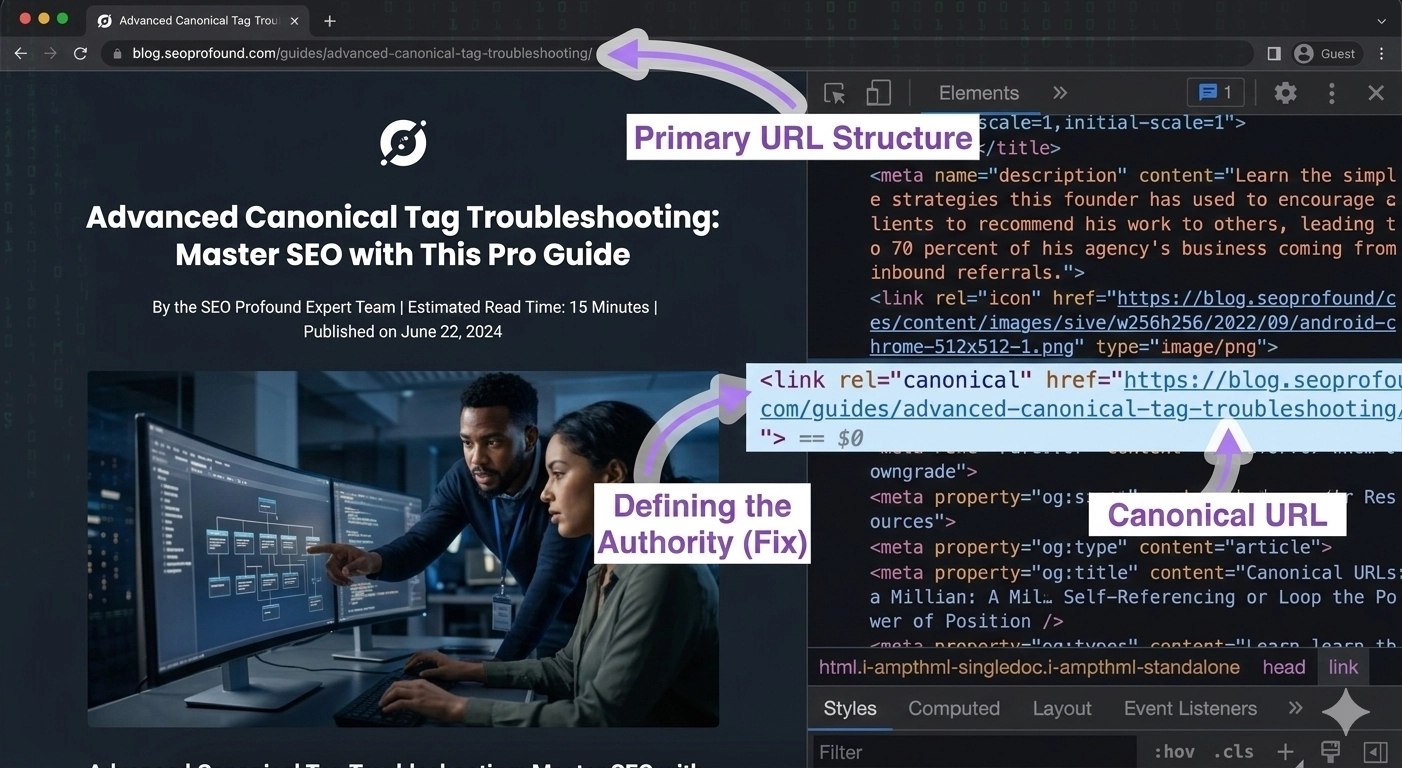
When managing a website, duplicate content can become a serious problem for search engine rankings. Search engines may struggle to determine which version of a page should be indexed or ranked. This is where Canonical URLs SEO becomes essential.
Canonical URLs help search engines understand the preferred version of a webpage when multiple URLs contain similar or identical content. By properly implementing canonical tags, website owners can avoid duplicate content issues and maintain strong search engine visibility.
In this guide, we will explore canonical URLs and SEO, including best practices, common issues, and how to fix them effectively.
What Are Canonical URLs?
A canonical URL is the main or preferred version of a webpage that you want search engines to index. When multiple URLs display the same content, a canonical tag tells search engines which version should be treated as the original.
For example, these URLs may lead to the same page:
example.com/product
example.com/product?ref=homepage
Without proper canonical tags, search engines might treat these as separate pages. Using Canonical URLs SEO, you can specify the preferred version and avoid ranking issues.
The canonical tag is added in the HTML <head> section of a webpage.
Example:
<link rel="canonical" href="https://example.com/product">This tells search engines that the specified URL is the primary version.
Why Canonical URLs Are Important for SEO
Implementing Canonical URLs SEO correctly offers several benefits for your website.
1. Prevent Duplicate Content Issues
Search engines may penalize websites that have multiple pages with identical content. Canonical tags help consolidate those versions into one main page.
2. Improve Search Engine Ranking
When multiple URLs compete with each other, ranking signals become diluted. Canonical URLs help focus ranking power on the preferred page.
3. Better Crawling Efficiency
Search engines have limited crawl budgets. Canonical tags help search engines crawl and index the most important pages on your website.
4. Cleaner Website Structure
Using canonical tags ensures your site maintains a consistent and organized URL structure.
Common Canonical URL Issues
Even though canonical tags are simple to implement, many websites still face problems related to Canonical URLs SEO.
1. Self-Referencing Canonical Errors
Some websites mistakenly point canonical tags to the wrong URL or an unrelated page.
2. Multiple Canonical Tags
Having more than one canonical tag on a page can confuse search engines and cause indexing issues.
3. Canonical Pointing to Redirected Pages
A canonical URL should always point to a final page, not a redirect.
4. Incorrect Canonical for Paginated Content
E-commerce and blog sites often misconfigure canonical tags for pagination, which can affect indexing.
How to Fix Canonical URL Issues
To improve Canonical URLs SEO, follow these practical steps.
1. Use Self-Referencing Canonical Tags
Each page should include a canonical tag pointing to itself if it is the preferred version.
2. Maintain Consistent URL Structure
Choose one version of your domain, such as HTTPS and either www or non-www.
3. Avoid Canonical Loops
Ensure canonical URLs do not point to pages that redirect to another page.
4. Check Canonical Tags Regularly
Use SEO tools like Google Search Console or site audits to detect canonical errors.
Best Practices for Canonical URLs SEO
To maximize the benefits of Canonical URLs SEO, keep these best practices in mind:
Always use absolute URLs in canonical tags
Add canonical tags to every indexable page
Avoid conflicting canonical and redirect rules
Ensure canonical URLs return a 200 status code
These steps help search engines properly understand your website structure.
Conclusion
Proper implementation of Canonical URLs SEO is crucial for preventing duplicate content and improving search engine rankings. By defining the preferred version of your pages, you help search engines index your content more efficiently and consolidate ranking signals.
Regularly auditing canonical tags and following SEO best practices will ensure your website remains optimized for both users and search engines.
Frequently Asked Questions
A canonical URL is the preferred version of a webpage that search engines should index when multiple URLs contain similar or duplicate content. In Canonical URLs SEO, a canonical tag tells search engines which page should be considered the original, helping avoid duplicate content issues and improving search rankings.
Canonical URLs are important because they prevent duplicate content problems and consolidate ranking signals into one main page. Proper Canonical URLs SEO implementation ensures that search engines index the correct page and improves overall website visibility in search results.
You can add a canonical tag inside the <head> section of your webpage’s HTML. The tag looks like this:
<link rel="canonical" href="https://example.com/preferred-page-url">Yes, canonical URLs can influence search rankings indirectly. When implemented correctly, Canonical URLs SEO helps search engines consolidate link equity and avoid duplicate content penalties, which can improve your website’s ranking performance.
A canonical tag tells search engines which page is the preferred version while keeping multiple URLs accessible. A 301 redirect permanently sends users and search engines from one URL to another. In Canonical URLs SEO, canonical tags are used when multiple pages should remain accessible but share the same main content.
Yes, it is recommended that every indexable page includes a canonical tag. Even if a page is the original version, a self-referencing canonical tag helps search engines clearly identify the preferred URL and strengthens Canonical URLs SEO practices.
You can check canonical tags using tools such as Google Search Console, browser page source inspection, or SEO auditing tools. Regularly reviewing canonical tags helps ensure your Canonical URLs SEO strategy is working properly.